Skip to content
Free shipping, delivered within 24-48* hours via BlueDart Express* Sale 500 discount on above 10,000 Purchase
Free shipping, delivered within 24-48* hours via BlueDart** Sale Discount

The Thinkware U1000 Pro is a dual-channel cloud dash cam featuring 4K UHD recording in the front and 2K UHD recording in the rear.

Original price Rs. 54,999.00 - Original price Rs. 54,999.00
Original price Rs. 54,999.00
Rs. 54,999.00
Rs. 54,999.00 - Rs. 54,999.00
Current price Rs. 54,999.00
Free Shipping

Free shipping for all orders above ₹ 999

Lowest Price

Offering the lowest Price in the Market

Local Shipping

Shipped from Chennai, India & Quick Delivery

1 Year Warranty

All Cameras come with a Warranty & Support

Authorized Store

Brand Authorised Store for Sales & Support

100% Satisfaction Guaranteed

Our Goal is Customer Satisfaction

Checkout securely with

DESCRIPTION

4K Front and 2K Rear

4K Front &
2K Rear

Capture every detail with stunning 4K UHD front and 2K QHD rear video. Dual HDR enhances contrast and balances bright and dark areas, making license plates, road signs, and critical moments easier to see. The optional rear camera is included with 2CH bundles for complete front and rear coverage.

Front and Rear HDR

Front & Rear
HDR

The front and rear cameras apply High Dynamic Range (HDR) processing to deliver smooth, lifelike video. By adjusting for both light and dark areas simultaneously, it maintains balanced exposure — revealing important details others might miss in glare, shadows, or sudden lighting changes.

Super Night Vision 3.0

Super Night
Vision 3.0

Drive with confidence after dark. Advanced image processing brightens nighttime footage and reduces noise for clearer recordings in low-light environments. From dimly lit streets to underground parking garages, critical details remain visible when they matter most.

Parking Surveillance

Protect your vehicle even when you're away with Motion & Impact Detection, Time Lapse, and Energy Saving Parking Modes designed to capture incidents while minimizing power consumption. Multiple parking modes allow you to tailor protection based on your environment and driving habits

*Requires installation of a hardwiring cable or OBD II power cable

READ MORE
FVDW
FCWS
LDWS
Smart Parking Mode

Smart Parking Mode

Prevent heat-related damage by automatically switching the U1000 PRO to a low-power mode if the temperature inside the vehicle gets too high during Parking mode. In this state, the dash cam records incidents triggered by impacts only until its operating temperature is safe again to resume Motion Detection or Time Lapse Parking Mode.

Energy Saving Mode with Radar Module

Energy Saving Mode with Radar Module

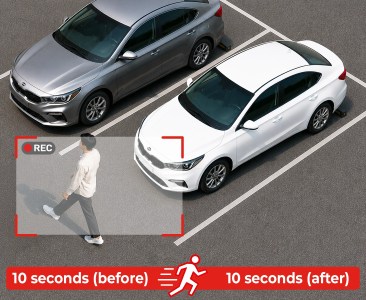
Connects an optional Radar Module to wake the dash cam from Sleep Mode. Minimizes power consumption while capturing a full 20-second clip (10s before/after) if an impact occurs.

Easy Wi-Fi
Device Pairing

Effortlessly pair your dash cam with any compatible Android or iOS device using the THINKWARE DASH CAM LINK app. Once connected, you can easily adjust settings, replay footage, and download your latest driving videos on the go.

App Screens
Supports up to 512GB

Supports up to 512GB

The U1000 PRO supports cards up to 512GB, allowing over 20 hours of continuous recording before auto-overwrite.

*For optimal performance and reliability, we recommend the THINKWARE 512GB MicroSD Card

THINKWARE CONNECTED

Receive impact notifications or monitor remotely what’s happening around your vehicle via your smartphone with the THINKWARE CONNECTED app.
Read More
1. Connecting the dash cam to a mobile hotspot device or a Wi-Fi network with Internet access will consume data. Carrier/Service Provider charges may apply.

2. The smartphone used to set up the Internet connection on the dash cam cannot also be used as a mobile hotspot for the dash cam. A different hotspot device/smartphone is required.

3. To connect the dash cam to the internet, use the Thinkware Dash Cam Link App. Once the dash cam is connected to the internet, you can go to the Thinkware CONNECTED app to get access to CONNECTED features.
High Dynamic Range

Impact Notifications

A serious impact stronger than 3G will trigger a push notification to the Thinkware CONNECTED app and send an emergency message to your registered contact.

Smart Auto-Exposure

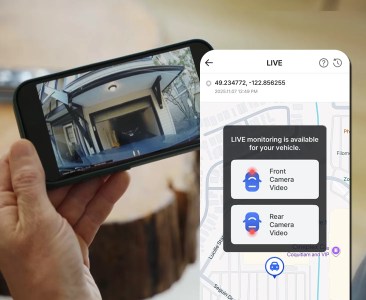
Remote Live View

Check what is happening around your vehicle in real time, no matter where you are.

Dewarping Technology

Last Parking Location

You can check the images of your front and rear view cameras of where you last parked, so you won’t have to remember where you parked your vehicle.

Fourth Feature

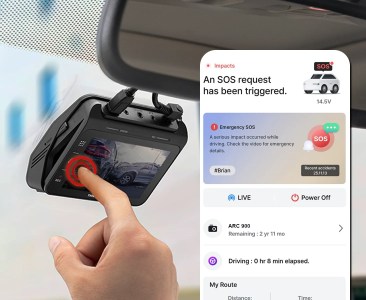
Send Emergency Message

In emergency situations, when you are unable to reach the phone, pressing the REC button on the dash cam for more than 3 secs will send an emergency message to your registered contact.

Advanced Driver Assistance Systems

Advanced Driver
Assistance Systems
(ADAS)

Front Vehicle Departure Warning

Front Vehicle
Departure Warning
(FVDW)

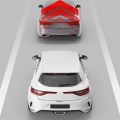
Forward Collision Warning System

Forward Collision
Warning System
(FCWS)

Lane Departure Warning System

Lane Departure
Warning System
(LDWS)